
Aviator
A fast-paced multiplier-style game built around a moving aircraft. Players follow the multiplier and the round activity, with outcomes that can change quickly.
Quick rounds
Multiplier format
Timing-based

MOJ Game app information and Android guide
Before installing the MOJ Game APK, review the app details, requested permissions and download source. Keep your Android security protections enabled and never share your password, OTP or payment PIN.
Explore MOJ Game app information, game categories, Android compatibility, installation steps and account safety guidance. Check the version and file details before installing the app on your device.
MOJ Game is a gaming app experience presented through a mobile-friendly interface with game categories, promotional areas and account features. This website brings the main app information together in one place, including the listed version, package size, Android requirement, installation guidance and answers to common questions.
Explore a gaming-style home screen with game tiles, category labels and dedicated areas for app activities.
Review the listed Android version requirement, package size and installation steps before setting up the app.
Understand the purpose of signup, login, profile details and account settings before sharing personal information.
Learn how to review permissions, protect OTPs and passwords, and check an APK before installing it.
The MOJ Game interface is organised around game tiles, promotional panels and account-related controls. Visitors can use this overview to understand the main areas of the app before moving to the installation and account guides.
The home screen presents game artwork and category tiles that help users browse the available sections. Open a game only after reviewing its rules and on-screen information.
Account areas may include profile details, login controls, referral information and app settings. Keep your login credentials private and review each action before confirming it.
Take a closer look at four game categories visible in the MOJ Game interface. Each card explains the general game format and the main elements to understand before opening a game.
A fast-paced multiplier-style game built around a moving aircraft. Players follow the multiplier and the round activity, with outcomes that can change quickly.
A gem-themed slot-style game featuring colourful symbols and spin-based rounds. Review the displayed paytable, features and rules before playing.
A classic 777-themed slot-style game with a simple spin-based format. Symbols and results are determined by the game mechanics and chance.
A tile-based game in which players reveal tiles while avoiding hidden mines. Read the rules and understand the risk of each round before making a selection.
Game outcomes may depend on chance and can be unpredictable. No result, bonus, reward or income is guaranteed. Set personal limits, never use money needed for essentials, and stop if gaming causes stress or financial difficulty. Check local laws and the app's terms before participating.
Read responsible-play guidanceTake a closer look at the MOJ Game home screen, promotional area and invite section. These visuals help explain the app layout and the types of controls visitors may encounter while navigating the app.
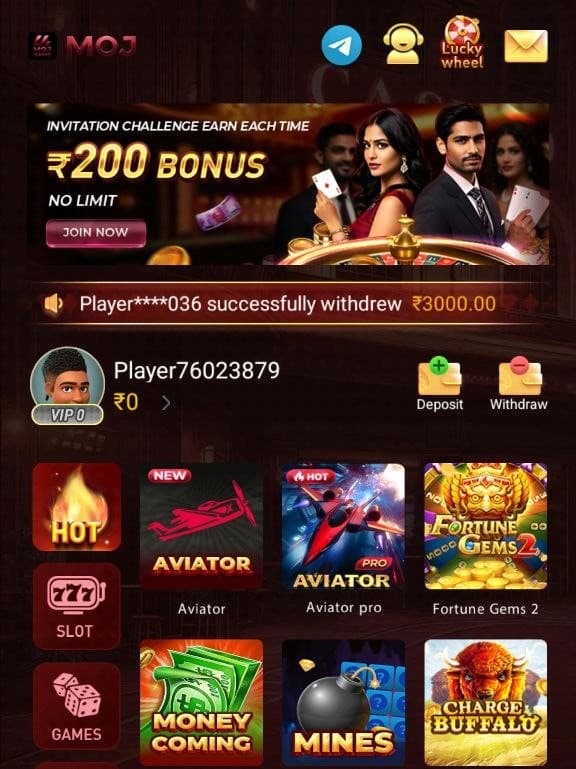
A view of the game-focused interface, category tiles and account area.
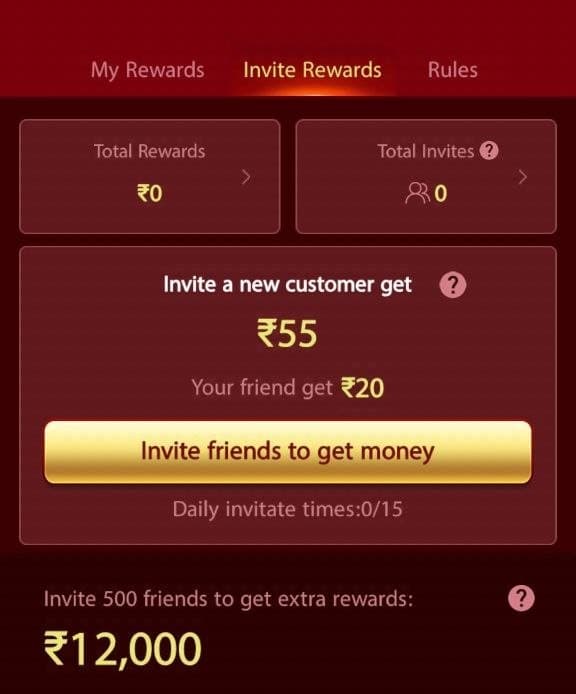
A view of the referral and promotional area. Check the applicable terms for eligibility.
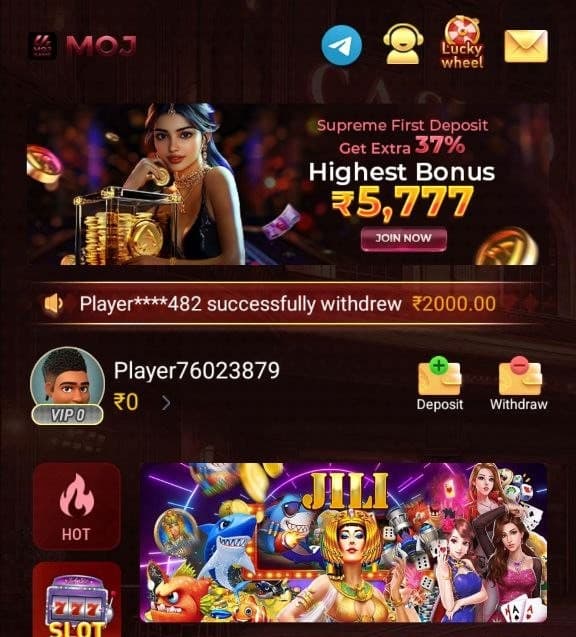
A promotional interface view with game artwork and app information.
Review the listed technical details before installing the MOJ Game APK. Make sure your Android device has enough storage and meets the stated operating-system requirement.
Mojgame.com
India – Pan-India
v14.5 (2026)
Approximately 42.8 MB
Android 5.0 (Lollipop) or higher
Scan the exact APK file with a trusted security tool before installation
Version, package size and device compatibility may change with future releases. Check the specific APK file and its source before installing. A security scan should be performed on the exact file you intend to use.
The MOJ Apk home screen brings together game artwork, category tiles and promotional panels. These sections are intended to make it easier to find the different areas available inside the app. The exact layout can vary by app build, screen size and updates, so users should read the labels and instructions displayed on their own device rather than relying only on an older screenshot.
A game tile generally acts as an entry point to a particular game or activity. Before opening a section, review its instructions, rules and any conditions shown on screen. Do not assume that two games have the same rules or that a promotional panel applies to every account. Take time to understand the information presented before making a decision.
The supplied MOJ Game interface includes game artwork and labels associated with categories such as Aviator, Mines, Slots and Fortune Gems. Use the category names to navigate the interface, then read the individual game instructions before starting. Rules, availability and in-app conditions may differ between categories.
Check how a game works, what each control does and whether any entry amount or other condition applies. Avoid making quick decisions based only on animations, promotional text or displayed balances. If the rules are unclear, do not proceed until you understand them.
The home area is the starting point for browsing game tiles and promotional sections. Account controls are generally grouped separately from game categories, helping users find profile and account-related options. Navigation labels and available sections may change when the app is updated.
Before selecting a profile, wallet, referral or settings control, read the next screen and confirm what action it will perform. Never share your password, OTP, UPI PIN or banking credentials with another person claiming to provide app support.
Before downloading an APK, check that the page or source clearly identifies the app and provides consistent version information. Review the file name, package details and requested permissions. Avoid download pages that redirect repeatedly, bundle unrelated installers or ask you to turn off device security protections.
The listed MOJ Game package size is approximately 42.8 MB. Make sure your device has enough free storage for the download and installation process. A download can fail if the connection is interrupted, the file is incomplete or the device does not meet the app's requirements.
Check available storage, Android compatibility and whether the APK download completed correctly. An incompatible or damaged package may not install. Do not install modified files from unknown sources or disable Play Protect simply to bypass a warning.
The app information listed on this page shows MOJ Game version v14.5, an approximate package size of 42.8 MB and Android 5.0 (Lollipop) or higher as the system requirement. Check the version displayed by the actual file before installing it, because a newer build may have different requirements or a different package size.
Compatibility can depend on the Android version, device hardware, available storage and app build. If installation fails, compare your device details with the requirements and check whether the APK is complete. Avoid downloading multiple copies from unrelated websites to solve an installation error.
If the app provides login or signup options, use the account process displayed inside the app and read the terms before submitting personal information. Use a strong, unique password where passwords are supported. Keep OTPs private and do not share account credentials with anyone.
Review the information requested during registration and understand how account details may be used. Do not submit identity documents, payment details or sensitive information through an unknown link or an unofficial support contact.
Promotional and referral sections may display offers or reward information. Read the complete terms to understand eligibility, validity, minimum requirements and any conditions attached to an offer. A promotional message or displayed balance should not be treated as a guarantee that money will be credited or withdrawn.
Never pay an unexpected fee to unlock a promised reward, and do not share your UPI PIN, OTP or banking password to receive a payment. If an offer is unclear, check its terms through the app's own information area before taking action.
Set limits around time and spending. Do not borrow money, chase losses or use funds needed for essentials. Take a break if gaming begins to affect your sleep, work, studies or relationships. Visit our Play Responsibly page for more practical guidance.
Before installing an APK, check its source, file integrity and requested permissions. Scan the exact file you downloaded. Security scan results apply to that particular file and time; they do not guarantee that an app operator or service is trustworthy.
Use the app guide to understand the main interface and app information. The Download page covers APK checks and Android installation. The FAQ page answers common questions about version, package size and compatibility, while the blog provides more detailed articles about account privacy and app safety.
The information pages are organised to help visitors move from a quick overview to a more detailed topic. Review the relevant guide before installing an app, creating an account or responding to a promotional offer.
Continue with a focused guide about app information, APK installation, account privacy and responsible use.
Understand the app interface, app information and key details to review.
Open app guideFollow practical steps for checking an APK source and installing it safely.
Read download guideReview account setup, personal information, OTPs and password safety.
Read signup articleFind answers about app version, Android compatibility and installation.
Browse FAQsSet personal limits and make informed decisions around game-related activity.
Read safety adviceUnderstand the scope and limitations of the information on this website.
View disclaimerRead more about APK installation, account setup, privacy and safer use of mobile gaming apps.
App SafetyA careful, step-by-step checklist for evaluating an APK source, permissions, file details and download claims before installing anything.
App InformationThe word Moj appears on different websites and apps. Learn why the publisher, app category and official listing matter more than a familiar name.
Account GuideUnderstand the questions to ask before registering, sharing a phone number or providing personal details to an unfamiliar app.
Find quick information about the MOJ Game app, Android compatibility, APK installation and account safety.
MOJ Game is presented on this website as an Android gaming app with a game-focused interface, game categories and account features. Review the app information and source details before installing any APK.
The app information section lists version v14.5. Always compare the version shown on the download file with the version and release details provided by the app source.
The listed package size is approximately 42.8 MB. The actual download size can vary if the package is updated or distributed in a different build.
The listed minimum requirement is Android 5.0 (Lollipop) or higher. Device hardware, available storage and the specific app build can also affect compatibility.
Download the file only from a source you trust, review the app permissions, scan the exact file and follow Android installation prompts. Do not disable device security protections to install an unknown package.
No reward, bonus or withdrawal should be treated as guaranteed. Read the applicable terms, eligibility rules, fees and withdrawal conditions before taking part or making a payment.
Review the MOJ Game version information, Android requirements and APK installation guidance. Keep your account credentials private and read the relevant terms before using app features.